


Brook Hall, Manchester

About the Property
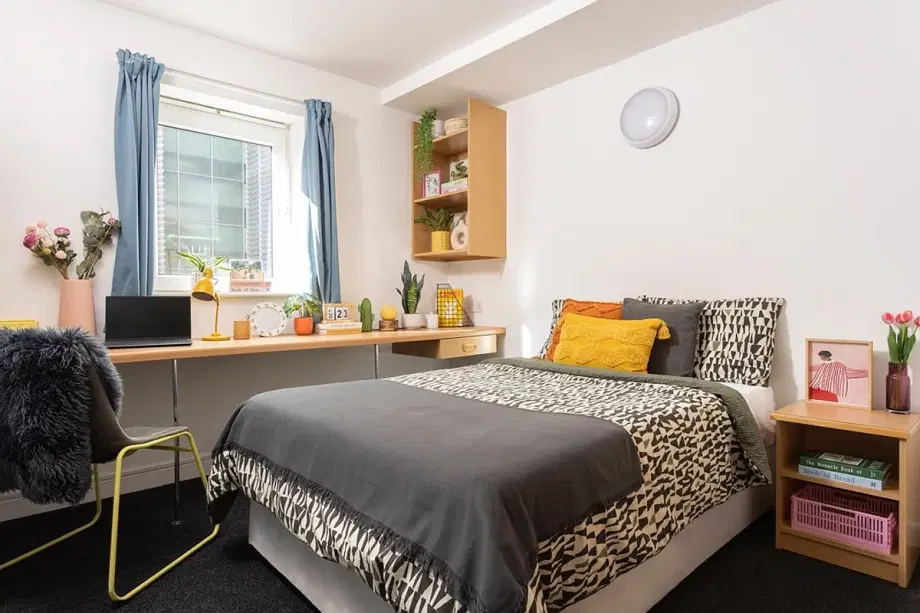
Living in Brook Hall gives you the choice of a range of en-suite rooms, meaning no matter which one you opt for, you’ll have a bathroom all to yourself. Rooms also come with a wardrobe, under bed storage, a study desk and a comfortable bed. Plus, you’ll have access to a fully-fitted kitchen and living space that is shared with your flatmates. There is a bike storage, an outdoor social space, a common area, and a car park with an extra charge.
Amenities
Shared Community And Utilities
Security
Property Services
Parking
Bills Included
Room Types
House Rules
Payment and Fees
Pay In Instalment
Payment in full Payment in 2 and 4 instalments (For some cities the maximum number of instalments is 3 for International students). Please note: They do not offer instalment for short tenancies.
Mode Of Payment
Credit/Debit card & Bank transfer. Note: Banks may make a deduction on the amount being paid as a transfer fee.
Guarantor Requirement
A guarantor (either UK based or International) is required for all customers who book with the property. A guarantor is someone over the age of 25 who takes joint financial responsibility for your tenancy. If, for any reason, you are unable to pay an amount owed to the property it is your guarantor’s responsibility to do so.
Booking Deposit
1. You are required to pay GBP 250 as advance rent payment at the start of your tenancy. 2. This advance rent payment will be put towards your first rent instalment. Note: For summer lets, you will be required to pay GBP 100 as advance rent payment.
Frequently Asked Questions
What bills do I need to pay?
Most bills, including electricity, water, heating and Wi-Fi, are included in your rent.
If you choose to watch live or on demand television you will need to pay for a TV licence.
Do students have to pay TV licence?
Where can I add or update my payment details?
Can I share a studio room with someone else?
Is there parking available at my property and how much does it cost?
When can I move in?
What bedding is suitable for a 3/4 sized bed?
A 3/4 sized bed is larger than a single but slightly smaller than a standard double.
It's worth checking online for 3/4 sized bedding specifically as many stockists now offer this. Otherwise, they would recommend opting for bedding that fits a small to standard double bed.
I want to move or upgrade my room. Can I do this?
How do I collect my key?
What do I need to bring with me to check in?
What should I do if I don’t have photo ID?
My flatmate didn't help to clean the kitchen. What do I do?
It's a good idea to plan for your check-out in advance of the end of your tenancy, so you can share the cleaning responsibilities. You and your flatmates are equally responsible for leaving the cupboards, fridge, and freezer empty and the kitchen clean.
If your flatmates have left without cleaning the kitchen it is your choice whether you do the cleaning yourself. Any charges will apply to all flatmates – yourself included – so we recommend putting in the effort to organise this ahead of everyone leaving.
What will happen when I arrive?
The team will be ready and waiting to check you in when you arrive, and give you the keys to your new room. If you have been asked to book a time slot for arrival, please make sure you stick to this.
You will receive information on your new home and city and they'll let you know what to do if you need any help or support while settling in.
Is there anything I can't bring with me when I move in?
Please leave anything illegal out of your new home. Candles and other hazardous items are not allowed either.
Unfortunately you'll need to leave any pets at home too. If you need a guide dog or working dog to assist you, please get in touch to discuss your options.
Fridges are another no-no. However, they do make some exceptions, for example if you’ve got a medical reason to have one. You'll need to check this with your property team before you move in.
You can find out what’s included in your room by checking the information for your room type on your amber webpage.
I’ve moved into my room, what do I need to do now?
Aside from exploring the local area, meeting your flatmates and enrolling at your university, you should also consider the following;
- Register with a GP – you can often do this on your university campus
- Open a UK bank account – your university’s international office should be able to help you with this
- Get a TV Licence – if you’ve got a TV in your flat or plan to watch TV online on your laptop you’ll need to get a TV licence.
- Fill in the Council Tax Exemption Form
– As a full-time student you don’t need to pay council tax but you will need to provide them with your Council Tax Exemption Form.
Do I have to pay council tax?
Do I need to buy contents insurance for my room?
Can I choose who I live with?
When you book with us, your room will be allocated at random. If you have a preference on who you'll be living with (for example same sex flatmates or postgraduate flatmates), you can contact us and we will try to meet your preferences, but we can't guarantee this as it is dependent on availability.
Already have a group of friends you want to live with? Book your group booking by reaching out to amber agent.
Can I book a flat with friends?
Do you provide bedding or do I need to bring my own?
Bedding is not provided in the properties. You will need to bring your own bedding to use when you arrive.
The property have partnered with UniKitOut, the UK's leading Student Kit supplier, so whether you need bedding, kitchen, bathroom, or everything - they have something for you. You can buy them from their online Shop.
Can someone else pick my key up for me?
Where can I see details of my room like my block and room number?
The easiest way to check your block and room number is to login to My Account.
You'll find a summary of your booking in the 'My bookings' section.
Your flat number, floor, and block (where applicable) can also be found on your tenancy agreement.
Can my family or friends stay for a few nights after dropping me off?
Are things like pots, pans and cutlery provided in the kitchen?
You’ll need to bring your own pots, pans and other kitchen items
We have partnered with UniKitOut, the UK's leading Student Kit supplier, so whether you need bedding, kitchen, bathroom, or everything - they have something for you. You can buy them from our online Shop.
You can find out what’s in your flat in your welcome guide.
I have a damage or cleaning charge to pay following my check out inspection. How can I make the payment?
My flatmate has left food in the freezer. What do I do?
Speak with your flatmates in advance of check-out to make sure all cupboards and the fridge/freezer will be left empty. It’s important to work together so that the activity can be shared equally.
If any food or belongings are left in the kitchen, they'll need to apply a charge for them to be removed, and the charge will be split equally between everyone in the flat including yourself. If you are the last person to check-out of your flat, we recommended that you make the decision on any food left in the cupboards, fridge or freezer – you may want to take it with you, donate it to the foodbank or dispose of it responsibly.
Do I need to clean my room and flat before I check-out?
Yes. You’re responsible for leaving your room clean and empty. You can recycle or donate unwanted items, and all rubbish must be disposed of responsibly. Any items left in your room will be removed, and they’ll need to apply a charge for this.
If you’re sharing a flat, it’s a good idea to find out when everyone is leaving so that the cleaning in your kitchen and hallway can be shared equally.
Please leave your kitchen / lounge / hallway clean and empty – don’t forget to clean inside the fridge and freezer, and to empty your cupboards to avoid cleaning charges. If there are any items or food left in the kitchen or hallway, then removal charges may apply.
All cleaning, damage and removal charges will be split equally between all tenants.
Can you store my luggage for a short time after I check out?
No. Unfortunately they're not able to store anything in the property after check-out, so you’ll need to take all of your belongings with you.
If you need to store your luggage locally, they've partnered with LOVESPACE who specialise in secure storage with collection and delivery options.
I left something in my room – can I come and pick it up?
Where can I park to load up the car?
An item in the flat has stopped working. Will I be charged for it?
I forgot to put on the inventory that there was some damage when I moved in. Will I be charged?
An item in the flat was damaged by my flatmate. Will I get charged for it too?
They do charge for damages, however, if the person responsible for causing the damage is willing to take full responsibility, then they will only charge that person. If no one accepts the responsibility for damages in a communal area, then the charge will be split equally between everyone in the flat.
It's better to report damages whilst you’re living with them so they can get it fixed, and you can avoid any charges when you leave.
If something has been damaged – even if by accident - please report it to a member of your Property Team straight away.
Can I make repairs myself?
Why is my credit no longer showing on my statement?
If you have a credit on your account, you will be able to see this on your account statement. However, if you have an upcoming future instalment (within the next 10 days) any credit that has previously shown on your account will have now moved to offset the future instalment.
This means that any rent will be deducted less the amount that your account was in credit.
Do you cater to different accessibility needs?
They cater for students of all abilities. From accessibility to neurodiversity, let’s work together to make student life easier for you. If there’s anything you need to tell us about before you arrive, they're here to listen and have a conversation on how they can make student life easier for you.
Let us know how they can help as far in advance as possible, so that they can make sure they accommodate you in the right way. You can contact by emailing the property or you can also take their pre-arrival disclosure form..
What accessibility needs are you unable accommodate?
Any condition which specifically requires staff intervention or requires staff to be first responders e.g. a seizure alarm that requires staff to respond.
Alcohol free, designated quiet, vegan, vegetarian, dietary restrictive, or one specific gender flats.
Specialist desk furniture/equipment. (This may be funded by Disabled Students Allowance, reach out to your universities disability team for further information).
What should I do if I'm concerned about my allergies?
What if I have temporary accessibility needs?
If you’ve recently had an injury (such as a broken bone) or have a condition that will temporarily affect you, let the property team know as soon as possible so they can make sure all the right safety measures are in place for you.
You can email or fill out our pre-arrival disclosure form .They may also require you to complete a temporary PEEP form with the property team. If you have already checked in and would like to make a disclosure, please fill out the post-arrival disclosure form.
Can I view the property and room before booking?
How do I set up a bank account?
If you’ve not got a UK bank account, it’s important that you get one when you arrive.
It will save you time to look into it before you get to the UK, but there’s no need to worry if you’ve left it a little late. Each bank will have different requirements about what is needed from non-UK nationals to open a bank account.
It’s safe to say that you will need some form of identification, and proof of your residency and course here in the UK as standard. In most cases, you’ll also need a letter from the property to confirm your UK address, and they're happy to provide this for you.
They may well require more information and documentation, and may even need to arrange a meeting with you before this can be set up.
There are so many banks here in the UK, and each will have a slightly different policy.
What should I do if I am going to be arriving later at night or early in the morning?
Is cleaning provided?
It’s your responsibility to clean both your room and the shared areas of your flat.
Find guidance on keeping your room and flat clean and tidy from the residence team.
My flatmates never clean our communal area. What can I do?
All flatmates are responsible for keeping the communal areas clean and tidy. First, try to establish a cleaning rota. The rota is the key to working together to keep the place clean. All it takes is four simple steps:
Make a list of the regular cleaning tasks that need to be done
Decide with your flatmates who’s doing what, and on which day
Write each task for each person in the relevant day column
Do your tasks on the relevant day, and tick the box when you’re done
If you're still having trouble getting your flatmates to do their part after establishing a rota and speaking to them about it, please speak to your team at reception who will try to help.
Find guidance on keeping your room and flat clean and tidy from the residence team.
When does the heating turn on and how do I control it?
The heating in properties maintain a base temperature to stop rooms from getting cold. You’ll then find a thermostat in your individual rooms that you can use to alter how warm your room is.
There are two types of thermostats in our properties. The most common version has a single boost button. When you hit the boost button on your thermostat, it means that the heating will ramp up for 45 minutes, and you can do this multiple times.
But once it hits the upper temperature, you won’t be able to keep increasing it. Instead, it will simply maintain that level of warmth when you press the button.
In some buildings, you'll find a different thermostat that has five different settings (off, low, medium, high, boost). You can choose which setting you would like to have the heating on, and then use the boost button to increase the temperature for 45 minutes.
Once that temperature has been reached, the heating won’t come on again unless the thermostat senses a drop below that pre-set temperature.
How do I make an insurance claim?
When you book with us the possessions inside your room are protected through property Insurance.
If you need to make a claim you'll need to get in touch with insurance Claim Centre.
How can I set up Wi-Fi calling?
Wi-Fi calling also known VoWiFi (voice over Wi-Fi), is a feature that allows you to make or receive calls and text messages over a Wi-Fi network. You can do this in the buildings by following these steps:
On Apple devices:
Make sure you are connected to the Glide Network and are signed in.
Go to settings > Phone > Wi-Fi Calling > On
On Android devices:
Make sure you are connected to the Glide Network and are signed in.
Go to settings > connections > WiFi calling > On > Set to Wi-Fi preferred to make sure that Wi-Fi calling is the default connection method when connected to Wi-Fi.
I'm having trouble connecting to the internet. What should I do?
If you’re having difficulty connecting, there’s a few things to check:
Clear your browsing history, cookies and cache
Forget the Wi-Fi network and search again
Turn off your Firewall -
remember to turn your firewall back on once you’re connected.
If you’re still unable to connect, or you think your internet has gone down, it’s best to contact your internet provider directly.
Your internet provider will depend on the property you’re living in:
Help with Glide Wi-Fi
Get in touch with Glide directly by calling or by emailing.
Help with University Wi-Fi
If your internet is provided by your university, your reception team will be able to help.
If you’re not sure who your internet provider is, talk to your reception team.
How do I connect to the internet?
When you choose to live with the property, access to up to 300Mb/s Wi-Fi is included in your rent. Connect up to 50 devices simultaneously, whether you're in the common room, study area or your bedroom, you're always connected.
Your Wi-Fi will be provided by Glide, unless it’s provided by your university. Glide delivers a Gigabit service with up to 1Gb on wired ports and 300MB on Wifi.You’ll be given further information on your internet provider when you arrive. In the meantime, you can check your Broadband and Wi-Fi availablity here.
Please be aware that some older devices may not be gigabit capable. Check your settings to find out more information on your connection.
How you connect to your Wi-Fi depends on the property you’re living in:
I've received a Passkey from Glide
Scan for available Wi-Fi networks, select
Glide-US-Resident
Enter your passkey
I haven’t received a Passkey from Glide
Scan for available Wi-Fi networks, select
Glide-US-Signup
or
US_Glide
Open a browser
Register your details on the Glide welcome screen
Help with Glide Wi-Fi
Get in touch with them directly by calling or by emailing.
How much does the internet cost?
How much does it cost to use the laundry facilities at my property?
Where is the laundry room located?
What do I do if I lose my keys and get locked out?
They have dedicated on-site Service and Safety teams in all the cities – which means that there will always be someone around to help if you need them. Part of their job is doing patrols of the buildings and attending to incidents, so don't worry if there is nobody at reception. You can let them know that you need help by contacting them via the security call point located near your reception or front door, or by calling the Emergency Control Centre.
You can also raise a locked out request in the property app, which will connect you directly to the Emergency Control Centre if you are locked out.
What’s a villavent and how should I use it?
What should I do if I have problems with my fridge freezer?
If you’re having problems with the temperature of your fridge, check the temperature control switch - this will indicate how cold the fridge is. You can find the control inside your fridge at the top.
If the drawers of your freezer are hard to open, you may need to defrost it.
How do I use the temperature control in my flat?
My small appliance is broken. What should I do?
If your toaster, kettle or iron has stopped working, they can arrange a replacement for you to collect from reception.
Simply raise a maintenance request in the property app and a member of your property team will be in touch to let you know when you can collect your replacement.
Please note that the following exclusions apply:
Toasters in Aberdeen properties
Kettles and toasters in Portsmouth properties
Toasters and irons in Bournemouth properties
Kettles, toasters and irons at Calthorpe Court and Beech Gardens in Birmingham
Kettles, toasters and irons at Cathedral Park in Bristol
Kettles, toasters and irons in Cardiff properties (Except Blackweir Lodge which provides all)
Kettles and toasters at Bridgewater Heights and Mill Point in Manchester
Kettles, toasters and irons in Southampton properties
What can be left if I'm only leaving for term holidays?
Your room is yours until the end of your contracted time listed in your Tenancy Agreement. That means you can leave anything you like in your room when you leave the property, for example the Christmas break.
There are a few things to remember to do before you leave your room:
Lock your bedroom door
Lock your windows and close your curtains
Take the rubbish out
Switch off the lights
Unplug your appliances
Do I have to move out during holiday periods like Christmas and Easter?
Is a TV included in my room?
There are TVs in many of the communal areas, and some bedrooms include TVs too - you can check what's available at your property on your property page or in your welcome guide. You'll be sent a link to your welcome guide before you arrive.
You will need a TV licence for your bedroom if you’re watching TV live or on-demand, and if you have a TV licence for your bedroom this automatically covers the communal kitchen too.
If you just want to watch TV in the communal kitchen, then you and your flatmates can arrange a single TV licence together. Students living in a studio will also need to arrange their own TV licence if you plan to watch TV live or on-demand.
I want to bring a TV to watch in my room - how can I connect this?
How you connect a TV in your room will depend on the property you’re living in. Most of our rooms don't have aerial points, but if you have a Smart TV you can connect through Wi-Fi.
If you plan to watch live or on demand TV, you’ll require a TV License. For more information on this, visit www.tvlicensing.co.uk.
Can I stay overnight with my student when I visit them?
What are your fire safety procedures?
The property work with Avon Fire and Rescue Service to go above and beyond what the fire safety regulations demand from our homes, policies, and procedures. The fire risk assessments are done by experienced assessors who are members of the Institution of Fire Engineers.
On-site teams test our fire alarms every week, and show all new arrivals their evacuation routes and assembly points - so they know exactly what to do in an emergency.
You'll find emergency signage located throughout each building, but if you’re ever unsure or worried, you can speak to staff who’ll be happy to explain where you’d need to go.
How can I keep safe from fire in my flat?
Nothing is more important than your safety, and that includes keeping safe from fire in your flat. There’s safety equipment and systems on site that help to keep you safe every day, but there’s a part for you to play too.
Here’s the best ways to keep fire safe in your flat:
Keep doorways and hallways free from obstructions
Keep fire doors closed and never wedge them open
Switch on your cooker extractor fan when you cook
Never leave your cooking unattended
Don’t start cooking if you’re tired or under the influence of drugs or alcohol
Never cover a heater or dry your clothes on them
Never cover a smoke detector
Use the bathroom fan when showering - steam, and even deodorant spray, can set off the smoke alarm
Never use faulty electrical equipment
Be careful to not overload plug sockets or extension leads when in use (appliances which give off heat should only ever be plugged in alone eg hairdryers etc)
And around the building:
Keep all exits and hallways clear of any obstructions
Never wedge communal fire doors open
Report any faults with fire doors or equipment to us as soon as you spot them
Never block emergency access to your building
Familiarise yourself with fire escapes and your fire assembly point
Only use the dedicated smoking areas and never smoke or vape inside
And remember, tampering with fire safety equipment is against the law. Don’t tamper with your fire extinguishers, fire alarm system, smoke detectors (including covering them), break-glass and fire exit signs.
What should I do if there’s a fire?
If there’s a fire in your flat, we know this can be scary. No matter how small or big, it’s important to act quickly. Don’t panic and follow these instructions:
Get out immediately if you hear the alarm
Leave your flat and close all doors behind you
Use the stairs, never use the lift
Call 999 – never assume someone else has
Stay away from your flat until you’re told it’s safe to return
There’s also key fire safety information in your flat usually on the back of your door, it’s a good idea to make yourself familiar with this when you arrive.
Your fire test day and time, as well as your assembly point, are in your welcome guide. Select your city and choose your property to find specific information for where you live.
How can I prevent false fire alarms?
False activations are frustrating. Not only do they disrupt you, but they can also make others become too relaxed when it comes to hearing the fire alarm. You should never assume a fire alarm is just a false activation, and always evacuate whenever you hear the alarm.
There are however a few things you can do to help reduce false alarm activations:
Keep the bathroom door closed when showering as steam can activate the fire alarm
Use aerosol sprays in the bathroom and turn on the extractor fan
Do not cover your bedroom heater with clothes or other items
Do not use candles
When cooking - open your kitchen windows slightly and keep your kitchen fire door closed. Don’t leave cooking unattended.
If your break glass point is damaged, let your Unite Students team know
Don’t smoke in the building
If you suspect that others might be smoking in the building, let your Unite Students team know
What’s your policy on smoking / vaping?
Do I need to pay a deposit to book a room at this property?
Is a guarantor required to book a room at this property?
Can I pay in instalments?
Brook Hall, Manchester
